How to Verify Vehicle Owner Details Online Legally and Safely
How to Verify Vehicle Owner Details Online Legally and Safely. When buying a used vehicle or verifying registration records, checking the vehicle’s background is an essential step. With the digitization of government excise systems, verifying vehicle details online has become fast, easy, and secure.
However, with many unofficial websites and scams claiming to offer private owner details, it is crucial to use only legal and authorized government channels. Doing so protects you from financial fraud, identity theft, and privacy violations.
In this guide, we will cover how to safely verify vehicle details, what information is legally available, and how to protect yourself from common online scams.
Why You Should Only Use Official Portals
Using official government databases to verify vehicle details ensures:
Data Accuracy: Official databases pull records directly from provincial excise and taxation departments.
Legal Safety: Searching through official portals complies with national data privacy laws. Unofficial tracking apps often scrape data illegally or collect user personal data without consent.
Scam Protection: Verifying records helps ensure the vehicle is not stolen, cloned, or burdened with unpaid taxes and outstanding fines.
What Details Are Legally Viewable Online?
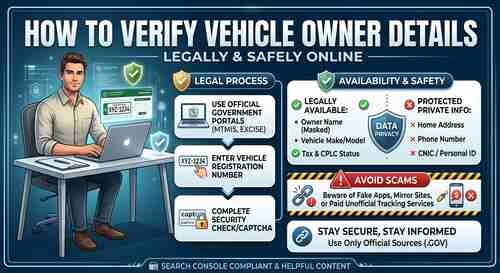
To balance public transparency with citizen privacy, government systems provide essential vehicle specifications while keeping personal identifying data safe.
| Information Available | Protected/Private Information |
| Owner Name (often partially masked for privacy) | Complete Home Address |
| Vehicle Make, Model & Color | Personal Contact / Phone Number |
| Engine & Chassis Numbers | National ID (CNIC/Aadhaar) Full Details |
| Registration Date & Tax Payment Status | Personal Financial Records |
| CPLC / Stolen Record Status (where integrated) | Third-Party Banking Information |
Step-by-Step: How to Verify Vehicle Details Online
Follow these step-by-step methods to check vehicle records through authorized channels.
1. Open Browser ──> 2. Visit Official Excise Portal ──> 3. Enter Reg # ──> 4. Verify Captcha ──> 5. View Records
Method 1: Via Official Provincial Excise & MTMIS Portals
In Pakistan, each province manages vehicle records via its official Motor Transport Management Information System (MTMIS) portal.
Visit the Official Department Website:
Punjab:
mtmis.excise.punjab.gov.pkSindh:
excise.gos.pkor official MTMIS Sindh portalKPK:
kpexcise.gov.pkIslamabad:
islamabadexcise.gov.pk
Locate the “Vehicle Verification” Section: Click on the verification tab on the homepage.
Enter the Registration Number: Input the vehicle plate number in the correct format (e.g.,
LEA-1234OR).Complete the Security Check: Solve the CAPTCHA or reCAPTCHA to confirm you are not a bot.
Review Results: The screen will show the registered owner name, vehicle specs, token tax history, and engine/chassis numbers.
Method 2: Via Official Mobile Apps & SMS Services
Many government authorities provide SMS-based or official mobile app verification services for quick access on mobile devices.
SMS Verification: Send the vehicle registration number to the official government shortcode (e.g., 8785 for Punjab Excise).
Official Mobile Apps: Use official government applications such as ePay Punjab or regional excise applications to track taxes and registration status.
Safety Warning: Avoid downloading third-party APK files from unofficial sites claiming to be “Vehicle Trackers.” Only install applications published directly by verified government accounts on Google Play Store or Apple App Store.
Red Flags & Common Online Scams to Avoid
To maintain online safety while searching for vehicle details, keep an eye out for these red flags:
🚩 Paid Third-Party Apps Asking for Personal Access: Any website or app claiming to disclose private home addresses or phone numbers for a fee is likely operating illegally or running a phishing scam.
🚩 Fake Mirror Websites: Fraudulent sites often copy official portal designs to display false verification reports or harvest user passwords and credit card details. Always double-check the domain extension (look for official
.govdomains).🚩 Unverified Sellers Refusing Biometric Transfer: If a seller’s details do not match the online verification report and they avoid official biometric verification during the sale, do not proceed with the transaction.
Best Practices for Buying a Used Vehicle
Verifying online details is step one. To complete a safe and legal transaction, follow these additional safety steps:
Match Engine and Chassis Numbers Physicality: Always physically check the engine and chassis numbers under the hood and compare them to the online record and physical registration book/smart card.
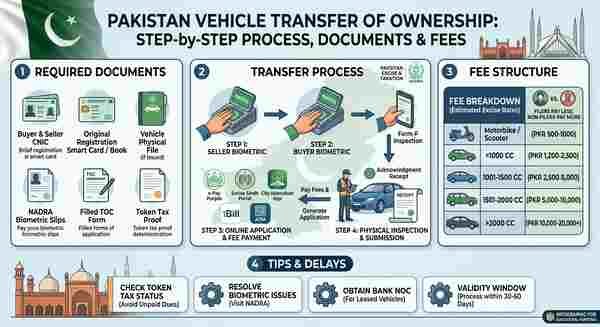
Complete Biometric Verification: Ensure the transfer is processed legally through official biometric verification at the local excise office or authorized center.
Obtain No-Objection Certificates (NOC): If the vehicle was registered in another region or had a bank loan, confirm all clearance certificates are verified and updated on the system.
Frequently Asked Questions (FAQs)
Q1: Can I check vehicle owner details completely free?
Yes, official MTMIS and Excise verification portals offer vehicle record verification completely free of charge.
Q2: Why is the owner’s full name or phone number masked on the portal?
Government portals partially mask owner names and hide personal contact numbers to comply with data privacy regulations and protect citizens from identity theft and harassment.
Q3: What should I do if the online record displays incorrect details?
If there is a mismatch between your physical documents and the online record, visit your nearest excise and taxation department office with original vehicle documents to request a correction.
Disclaimer: This article is for informational purposes only. Vehicle verification should always be conducted via official, government-authorized websites and departments. Never share personal sensitive information or financial credentials on unverified third-party platforms.