Understanding Parivahan Sewa Services: A Complete Beginner’s Guide
Understanding Parivahan Sewa Services: A Complete Beginner’s Guide. Navigating government transport services used to mean standing in long queues and dealing with endless paperwork. To modernize and simplify this process, the Ministry of Road Transport and Highways (MoRTH) in India launched Parivahan Sewa—a centralized digital portal designed to bring essential transport-related services directly to citizens.
Whether you need to apply for a driving license, register a new vehicle, or pay road tax online, Parivahan Sewa serves as a one-stop platform. This complete beginner’s guide breaks down everything you need to know about the portal and how to use it safely and effectively.
What is Parivahan Sewa?
Parivahan Sewa is an official web portal managed by the National Informatics Centre (NIC) under MoRTH. Its main objective is to digitize transport office operations across India, ensuring transparency, reducing delays, and improving efficiency for everyday road users.
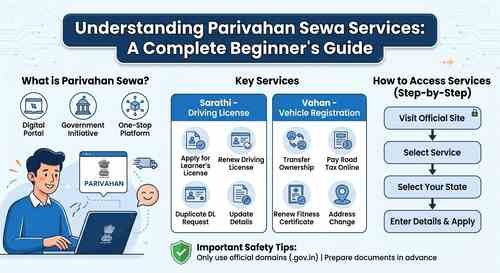
The platform primarily operates through two core systems:
Vahan: Manages vehicle registration records, tax payments, and permit issuances.
Sarathi: Manages driving licenses, learner permits, and driving school licensing.
Key Services Offered on Parivahan Sewa
The portal provides a wide array of citizen-centric services. Here are the most commonly used features:
1. Driving License Services (Sarathi)
Learner’s License (LL) Application: Apply online, upload documents, and take online slot bookings or tests.
Driving License (DL) Renewal: Renew an expiring license without visiting the RTO physically in many states.
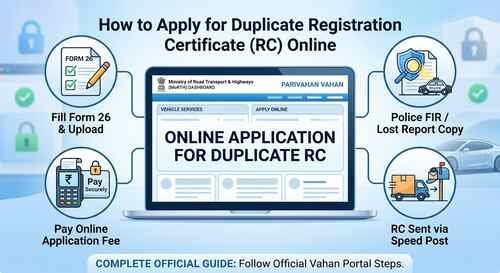
Duplicate DL Request: Apply for a duplicate license in case of loss or damage.
Address or Detail Updates: Update personal information linked to your driving records.
2. Vehicle Registration Services (Vahan)
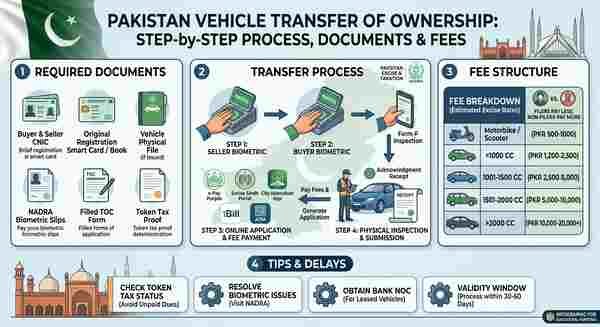
Transfer of Ownership: Initiate vehicle ownership transfer online.
Road Tax Payment: Pay state road taxes and commercial vehicle permit fees securely.
Fitness Certificate Renewal: Apply for vehicle fitness checks and certificates.
Change of Address in RC: Register a new address on your registration certificate.
3. Check Status & Digital Documents
Application Status: Track the real-time progress of your DL or RC applications.
e-Challan Payment: Check pending traffic fines and pay them online directly.
mParivahan Mobile App Integration: Access digital copies of your DL and RC on your mobile phone, which are legally recognized at traffic checkpoints.
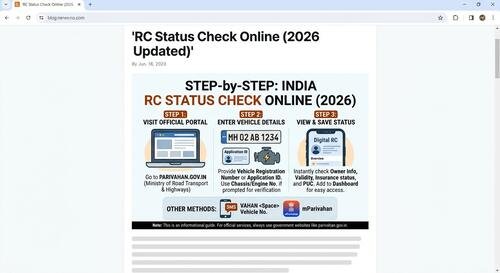
Step-by-Step Guide to RC Status Check Online (2026 Updated)
How to Access Services on the Portal (Step-by-Step)
Using the Parivahan portal is straightforward once you know where to go. Here is a general step-by-step workflow for beginners:
1. Visit Official Site ➔ 2. Select Service Category ➔ 3. Select State ➔ 4. Enter Details & Submit
Visit the Official Website: Always ensure you are on the official government website.
Select the Required Service: On the homepage navigation bar, hover over “Online Services” and choose either “Driver/Learner’s License” or “Vehicle-Related Services.”
Select Your State: Since transport rules vary slightly by region, select your respective state/UT from the drop-down menu.
Authenticate & Apply: Enter your details (e.g., Aadhaar number, existing application number, or vehicle registration number) to proceed with your application.
Upload Documents & Pay Fees: Attach clear scanned copies of required documents and complete payment through the official payment gateway.
Tips to Avoid Scams and Stay Safe Online
Because transport services involve sensitive personal data, phishing websites often try to mimic government portals. Keep these safety tips in mind:
Verify the URL: Always check that the domain ends in
.gov.in. Avoid third-party sites claiming to issue licenses faster for an extra fee.Keep Documents Ready: Have clear scans of identity proof, address proof, age proof, and passport-sized photos before starting an application.
Use Official Apps: Download the mParivahan app only from verified stores (Google Play Store or Apple App Store).
How to Verify Vehicle Owner Details Online Legally and Safely
Conclusion
The Parivahan Sewa portal has streamlined transport administration in India, saving citizens time and reducing manual paperwork. By shifting services online through Sarathi and Vahan, accessing driving licenses and vehicle registration updates is now faster and more transparent than ever.