Step-by-Step Guide to RC Status Check Online (2026 Updated)
Step-by-Step Guide to RC Status Check Online (2026 Update). Verifying your Registration Certificate (RC) status for a car, motorcycle, or commercial vehicle has become significantly faster and more accessible. Whether you have recently purchased a new vehicle, applied for an RC renewal, transferred ownership, or are evaluating a pre-owned vehicle, checking the online RC status is essential to ensure legal compliance and avoid unnecessary traffic fines.
This updated 2026 guide provides a clear, step-by-step walkthrough to verify your RC status using official government portals, mobile applications, and offline SMS methods.
Required Details for Online RC Verification
Before starting the verification process, ensure you have the following information ready:
Vehicle Registration Number (e.g., DL01AB1234)
Application Number (If you applied for RC renewal, duplicate RC, or ownership transfer)
Chassis Number & Engine Number (Last 5 digits required for secure verification)
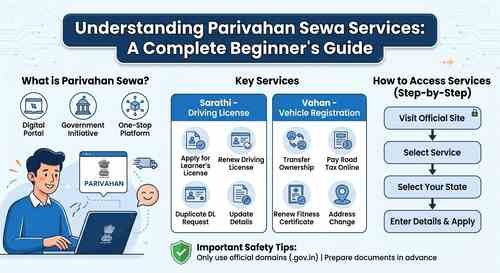
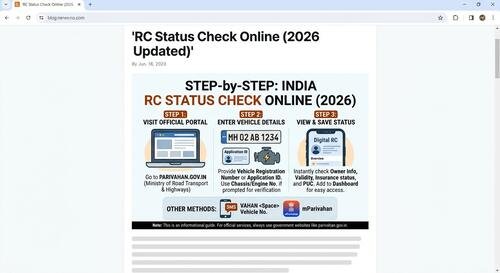
Method 1: Official Parivahan Sewa Portal (Web Browser)
The most authoritative and detailed method to check vehicle records is through the Ministry of Road Transport and Highways (MoRTH) official web portal:
Visit the Official Website: Open your web browser and navigate to it.
Access Online Services: On the top navigation menu, hover over ‘Online Services’ and select ‘Vehicle-Related Services.’
Select Your State: Choose your respective state/union territory from the drop-down menu.
Choose Verification Option: Select ‘Know Your Application Status’ (for pending applications) or navigate to ‘RC Status / Citizen Services.’
Enter Required Information: Input your vehicle registration number or application number accurately.
Complete Security Captcha: Enter the security code displayed on the screen and click ‘Submit’ or ‘Proceed.’
View Results: The dashboard will display comprehensive details, including Owner Name, RC Expiry Date, Vehicle Fitness, Insurance Validity, and Hypothecation Status.
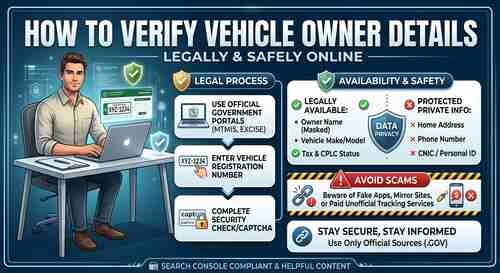
How to Verify Vehicle Owner Details Online Legally and Safely
Method 2: Using the mParivahan Mobile App
For mobile users, the official mParivahan app offers an instant, on-the-go solution:
Download the mParivahan app from the Google Play Store or Apple App Store.
Sign in using your registered mobile number and complete the OTP verification.
Enter your vehicle registration number into the main search bar and tap Search.
The screen will present a virtual RC. You can tap ‘Add to Dashboard’ to store the digital copy securely on your device for offline reference.
Method 3: Offline RC Status via SMS (No Internet Required)
If you lack an active internet connection, you can fetch basic registration details via SMS:
Open your phone’s Messaging application.
Format the message (e.g.).
Send the SMS to 7738299899.
You will receive an automated reply containing the vehicle’s basic RC details, validity, and RTO information.
Important Verification Checklist
When reviewing your RC status online, pay close attention to the following indicators:
Registration Status: Confirm that the status reads Active.
Insurance Expiry: Verify that your insurance policy details are updated and valid.
PUC (Pollution Under Control) Validity: Ensure your emissions certificate date has not expired.
Pending E-Challans: Check whether there are any unpaid traffic violations logged against the vehicle.
Troubleshooting Common Issues
Frequently Asked Questions (FAQs)
Q1: Is there a fee for checking RC status online?
Ans: No. Checking RC status on the official Parivahan website, the mParivahan app, or via DigiLocker is completely free of charge.
Q2: Why is it important to check RC status before buying a used vehicle?
Ans: It allows you to confirm genuine ownership, ensure the vehicle is not blacklisted or reported stolen, and verify if there is an active bank loan (hypothecation) on the vehicle.
Q3: Is a digital RC valid during police checks?
Ans: Yes. As per Ministry of Road Transport and Highways (MoRTH) guidelines, Virtual RCs stored in the mParivahan app or DigiLocker hold equal legal status to physical documents.
⚠️ Important Disclaimer: This article is strictly for educational and informational purposes. This website is an independent entity and is not directly affiliated, associated, authorized, or endorsed by any government agency or the Ministry of Road Transport and Highways (MoRTH). For official government services, online applications, and official record verifications, please visit the official portal directly at parivahan.gov.in.