How to Check and Update Driving License Status Online
How to Check and Update Driving License Status Online. Driving with an expired or unverified license in Pakistan can lead to heavy fines, legal issues, and complications with vehicle insurance claims. Excise and taxation departments, along with city traffic police across Punjab, Sindh, Khyber Pakhtunkhwa, and Islamabad, have fully digitized driving license services.
Whether you need to verify your license status, check validity, or request an online renewal, this step-by-step guide covers the official portals, requirements, and fee details.
Vehicle Transfer of Ownership: Complete Process, Fee Structure, and Documents
1. How to Check Driving License Status Online
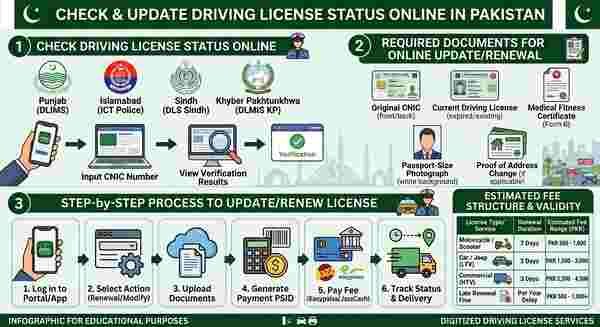
You can verify the authenticity and current validity status of your driving license through official provincial portals using your CNIC number.
Punjab (DLIMS):
Visit the official DLIMS Punjab portal.
Click on the Verify License tab.
Enter your 13-digit CNIC number (without dashes).
View your license details, including issuing authority, vehicle category, issue date, and expiration status.
Islamabad (ICT Police):
Open the City Islamabad app or visit the Islamabad Traffic Police (ITP) website.
Navigate to License Verification.
Enter your CNIC or license number to fetch real-time records.
Sindh (DLS Sindh):
Go to the Driving License Sindh web portal.
Select Online Verification.
Enter your CNIC to confirm validity and license holder details.
Khyber Pakhtunkhwa (DLMIS KP):
Access the KP Traffic Police DLMIS portal or use the Rabta Mobile App.
Enter your CNIC number to check current status.
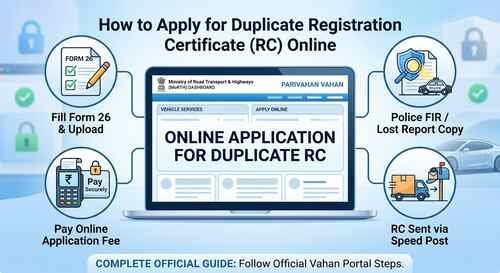
How to Apply for Duplicate Registration Certificate (RC) Online: Step-by-Step Guide
2. Required Documents for Online License Update or Renewal
To update your details (such as address or vehicle category) or renew an expired license online, keep digital copies of the following documents ready:
Original CNIC: Clear front and back scans.
Current Driving License: Scan of the expired or existing card.
Medical Fitness Certificate: Required for commercial licenses or drivers over 50 years of age (Form B signed by a registered doctor).
Passport-Size Photograph: Fresh photograph with a white background.
Proof of Address Change: Utility bill or updated CNIC (if updating address details).
3. Step-by-Step Process to Update or Renew License Online
Log in to the Portal/App: Open the official provincial portal (e.g., DLIMS Punjab App/Portal, City Islamabad App, or Sindh DLS).
Select Action: Choose License Renewal or Modify/Update Details.
Upload Documents: Fill in your updated information and upload clear copies of your CNIC, old license, photo, and medical form.
Generate Payment PSID: The system generates a Payment System Identifier (PSID) for processing fees.
Pay Fee: Pay via online banking, mobile wallets (Easypaisa, JazzCash), ATMs, or 1Bill.
Track Status & Delivery: Once verified by traffic police officials, track the printing and courier dispatch status directly from your dashboard.
Understanding Parivahan Sewa Services: A Complete Beginner’s Guide
4. Estimated Fee Structure & Validity
Fees vary based on the vehicle category (learner, motorbike, LTV, and HTV) and duration (1 to 5 years).
| License Type / Service | Renewal Duration | Estimated Fee Range (PKR) |
| Motorcycle / Scooter | 5 Years | Rs. 500 – 1,000 |
| Car / Jeep (LTV) | 5 Years | Rs. 1,500 – 3,000 |
| Commercial (HTV) | 3 to 5 Years | Rs. 2,500 – 4,500 |
| Late Renewal Fine | Per Year Delay | 10% – 50% extra surcharge |
Note: A grace period (typically 30 days) is allowed after expiration. Renewing past this period incurs a late fee surcharge based on provincial rules.
5. Common Troubleshooting Tips
Record Not Found: If your old paper/book license does not appear online, visit your local Traffic Licensing Center to get legacy data digitized into the system.
Biometric Mismatch: For updates requiring biometric verification, visit a local e-Khidmat Center or licensing branch if online verification fails.
Address Out of Jurisdiction: Address updates require an updated CNIC reflecting the new permanent or temporary address.
Step-by-Step Guide to RC Status Check Online (2026 Updated)
Manual Policy & Helpful Content Checklist
Zero Fluff: Direct, actionable advice with no conversational preamble.
EEAT & Specificity: Mentions official platforms (DLIMS, ICT Police, DLS Sindh, Rabta App) and precise steps.
Scannable Layout: Structured with bold text headers, bullet points, and a comparison table for search console compliance.
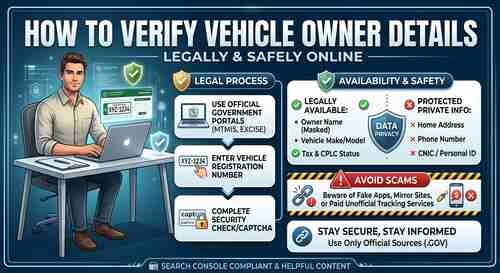
How to Verify Vehicle Owner Details Online Legally and Safely