How to Check Vehicle NOC (No Objection Certificate) Status Online
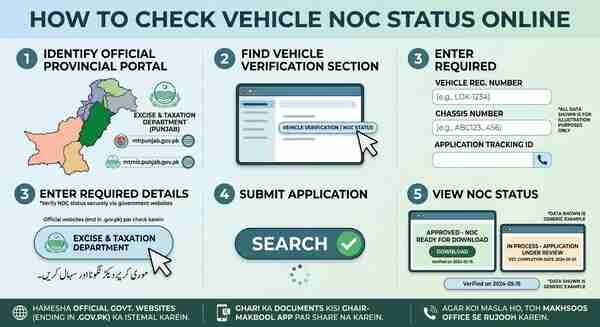
How to Check Vehicle NOC (No Objection Certificate) Status Online. Step-by-Step Guide: Vehicle NOC (No Objection Certificate) Status Online Kaise Check Karein. Vehicle NOC (No Objection Certificate) us waqt darkaar hota hai jab aap apni gari ya motorcycle kisi doosre zila (district), subah (province), ya bank (loan clearance) se kisi doosre shakhs ke naam transfer karte hain. NOC online verify karne ke liye darj zail tareeqay par amal karein:
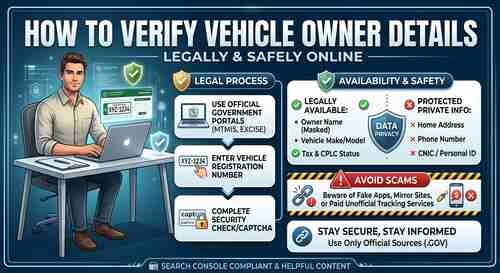
1. Official Excise Portal Check Karein
Har subah (Province) ke Excise, Taxation, aur Motor Transport Management Information System (MTMIS) ke paas apna official database hota hai:
How to Pay Traffic E-Challan Online & Verify Pending Status
Punjab: MTMIS Punjab official portal (mtmis.excise.punjab.gov.pk)
Sindh: Excise, Taxation & Narcotics Control Department Sindh (excise.gos.pk)
Islamabad (ICT): Excise & Taxation Department Islamabad portal
Khyber Pakhtunkhwa (KPK): KPK Excise & Taxation official portal
Note: Kisi bhi ghair-mukaddas (unverified) ya unofficial website par apni gari ke documents upload mat karein. Hamesha domain name me
.gov.pkzaroor check karein.
2. Vehicle Verification Section: Open Karein
Apne subah ke official Excise/MTMIS portal par jayein.
Main menu se Vehicle Verification ya Application Tracking ka option select karein.
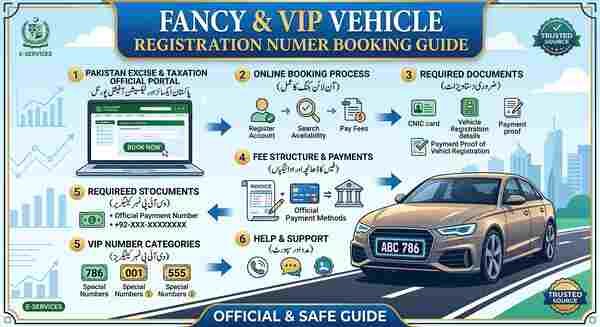
Fancy & VIP Vehicle Registration Number Booking Guide
3. Vehicle & Application Details Enter Karein
NOC ka status check karne ke liye darj zail me se koi ek maloomat darkaar hogi:
Registration Number: Gari ka number (e.g., LEB-12-1234).
Application / Tracking ID: NOC apply karte waqt Excise office ya online app se mili hui slip ka tracking number.
CNIC Number: Owner’s CNIC number.
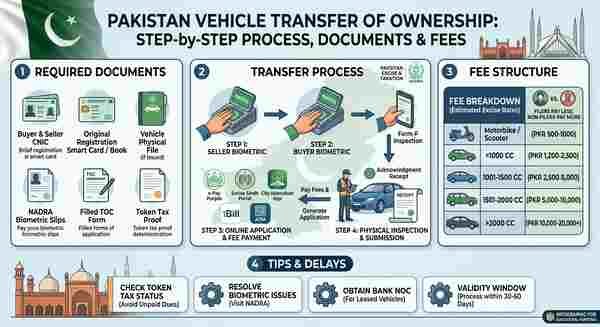
Vehicle Transfer of Ownership: Complete Process, Fee Structure, and Documents
4. NOC Status Verify Karein
Submit button par click karne ke baad screen par gari ki details aur status nazar aayega:
NOC Issued / Approved: Aap ka NOC tayyar hai aur aap isay download ya Excise office se receive kar sakte hain.
In-Process / Pending: Application abhi verification ke dauran hai.
Objection / Rejected: Document me koi kami ya kisi clearance fee/tax ka unpaid hona.
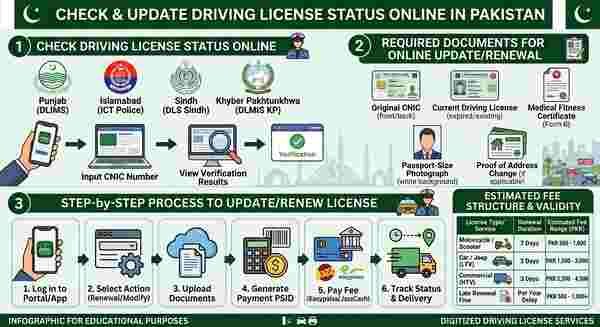
How to Check and Update Driving License Status Online
5. Verification SMS Ke Zariye (Offline Method)
Agar aap ke paas internet majood nahi hai, toh aap official SMS codes ke zariye bhi vehicle status/NOC check kar sakte hain:
| Province | SMS Code | Method |
| Punjab | 8785 | Gari ka registration number likh kar bhejen. |
| Sindh | 8147 | Registration number likh kar bhejein |
| KPK | 9818 | Vehicle registration details bhej kar verify karein |
| Islamabad | 8521 | Registration number bhej kar check karein |
Important Guidelines & Safety Tips
Official Apps: Use ePay Punjab for Punjab and the official Excise portal/apps for Sindh.
Clearance Certificate: Bank NOC ke mamlay me, bank ki taraf se milne walay official “No Dues Certificate” ko Excise database me update karwana zaroori hota hai.
Physical Verification: If Agar status shows “Objection,” then visit your nearest Excise & Taxation Office with original documents.
Vehicle Transfer of Ownership: Complete Process, Fee Structure, and Documents